Effects & overlays
This page shows you how to put an animated background behind an app, let rain or snow fall over it, give an effect new colors, and choose the animation between two apps.
What you get
Replace <awtrix-ip> with the IP address of your clock and run:
curl -X PUT http://<awtrix-ip>/api/v1/apps/pushed/demo \
  -H 'Content-Type: application/json' \
  -d '{"text":"HELLO","effect":"Pacifica"}'

Ocean waves move behind the text. The app demo joins the rotation at once. To remove it:
Always send Content-Type: application/json. Without it, curl -d marks the body as a form,
and AWTRIX refuses a PUT with that
(Content-Type). If nothing changes,
check this header first.
How it behaves
| Tool | What it does | How you set it | For |
|---|---|---|---|
| Effect | an animation behind the text and the icon | effect |
one app |
| Overlay | rain, snow and more, over everything | overlay, or Display → Weather overlay |
one app, or all apps |
| Palette | new colors for an effect or an overlay | palette |
one app |
| Transition | the animation between two apps | Display → App rotation, or transitionEffect |
all apps |
- An effect fills the whole display, so it takes the place of
backgroundColor. - A palette and
effectSpeedbelong to the app that sends them. Another app with the same effect keeps its own colors and speed. - Upper and lower case do not matter in a name. An unknown name is refused with
422 validationFailed, and nothing is saved. - A pushed app or a notification is drawn at double size, and so is its effect. An overlay uses every pixel of the display.
How the display works shows what is drawn over what.
Pick an effect
AWTRIX has 19 effects. Three of them:
curl -X PUT http://<awtrix-ip>/api/v1/apps/pushed/demo \
  -H 'Content-Type: application/json' \
  -d '{"text":"HELLO","effect":"Matrix"}'

Green trails fall down the columns.


All 19 effects, each with what it looks like:
Visual reference → Background effects. Without
effect, or with "effect":"", the app has no background effect.
Slow it down or speed it up
effectSpeed multiplies the normal speed: 2.0 is twice as fast, 0.5 half as fast. It works the
same on every effect and every overlay.
curl -X PUT http://<awtrix-ip>/api/v1/apps/pushed/demo \
  -H 'Content-Type: application/json' \
  -d '{"text":"CALM","effect":"PlasmaCloud","effectSpeed":0.25}'

effectSpeed goes from 0.1 to 10. Text painted from a palette has its own speed,
paletteSpeed, see Painting from a palette.
Recolor an effect with a palette
Without a palette, every effect uses its own colors. A palette gives it a set of colors to use
instead.
curl -X PUT http://<awtrix-ip>/api/v1/apps/pushed/demo \
  -H 'Content-Type: application/json' \
  -d '{"text":"HOT","effect":"Plasma","palette":"Heat"}'
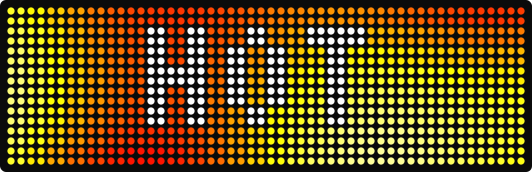
Eight palettes are built in, for example Heat, Lava and Ocean. All eight and their
colors: Visual reference → Palettes.
curl -X PUT http://<awtrix-ip>/api/v1/apps/pushed/demo \
  -H 'Content-Type: application/json' \
  -d '{"text":"MINE","effect":"Plasma","palette":["#FF0000","#FF8800","#FFFF00","#FFFFFF"]}'

Up to 16 colors, in any color form. They are spread evenly and blended, so four colors make a smooth gradient of four colors.
A name is first looked up as the file /PALETTES/<name>.txt on the clock, with one hex color
per line. The palette editor makes these files for you. The format:
Visual reference → Custom palettes.
paletteBlend decides how the colors meet: true (default) blends them smoothly, false gives
16 sharp color bands.
Add weather on top
An overlay is drawn over the finished app, and your text and icon stay readable underneath. For
one app, put overlay into its JSON:



All six overlays, each with what it looks like: Visual reference → Weather overlays.
The app's effectSpeed and palette apply to its overlay too. A palette recolors the drops,
flakes, lightning and frost.
Put weather over every app
- Open Display in the web UI.
- Under Weather overlay, pick an Overlay. Overlay speed sets how fast it moves: 100 % is the normal speed.
- Press Save.
An app with an overlay of its own shows that one instead. Built-in apps show only this one.
Over the API
PATCH /api/v1/display sets one overlay for all apps:
curl -X PATCH http://<awtrix-ip>/api/v1/display \
  -H 'Content-Type: application/json' \
  -d '{"overlay":"rain"}'
overlaySettings changes its speed and colors. It takes speed, palette and blend in one
object:
# rain at a third of its normal speed
curl -X PATCH http://<awtrix-ip>/api/v1/display \
  -H 'Content-Type: application/json' \
  -d '{"overlay":"rain","overlaySettings":{"speed":0.3}}'
Switch it off with null:
curl -X PATCH http://<awtrix-ip>/api/v1/display \
  -H 'Content-Type: application/json' \
  -d '{"overlay":null}'
GET /api/v1/display shows the overlay that is set. Details:
Visual reference → Setting the global overlay.
Change how apps swap: transitions
A transition is the animation from one app to the next. It is a setting for all apps.
- Open Display in the web UI.
- Under App rotation, pick a Transition effect and set the Transition duration.
- Press Save.
What each animation looks like: Visual reference → Transitions.
Over the API
curl -X PATCH http://<awtrix-ip>/api/v1/settings \
  -H 'Content-Type: application/json' \
  -d '{"transitionEffect":"Pixelate","transitionDurationMs":600}'
transitionEffectpicks one of 22 animations. Default:Rain.transitionDurationMsis how long it takes. Default:1000ms.autoTransition: falsestops the clock from moving to the next app by itself.
All transition settings: Settings.
Discover the names AWTRIX accepts
Ask the clock:
{"effects":["BrickBreaker","Checkerboard","..."],
 "paletteEffects":["Checkerboard","ColorWaves","..."],
 "transitions":["Random","Slide","..."],
 "overlays":["drizzle","frost","..."],
 "palettes":["Cloud","Lava","..."]}
effects, overlays, transitions and palettes hold every name the clock accepts.
paletteEffects lists the effects that use a palette: use it if you build a palette picker. What
each list holds: Discovering the names.
Good to know
backgroundColoris ignored. An effect fills the whole display. Leave outeffectfor a plain color behind your text.- A palette changes nothing.
PingPong,MatrixandLookingEyeskeep their own colors.paletteEffectslists the effects that take a palette. paletteBlendchanges nothing. It needs apalettein the same request.- A built-in palette shows other colors. A palette file with its name replaces it. Press
Restore the built-in in the palette editor, or delete
/PALETTES/<name>.txt. - The text is hard to read over a busy effect. Slow it down (
"effectSpeed":0.3), use a dark palette ("palette":"Ocean"), or pick a calmer effect. An effect cannot be dimmed.
Details
- Background effects: all 19 effects, and which ones take a palette
- Effect settings:
effectSpeed,paletteandpaletteBlend, with their ranges - Weather overlays: all six overlays, the overlay for all apps and which one wins
- Palettes: the built-in palettes and palette files
- Transitions: all 22 transitions
- Render order: every layer of an app
- Errors: the error format. Check its
codeandfieldin your automations, not the message text.
Related
- Visual reference: every effect, overlay, palette and transition
- App & notification payload: every key you can use next to
effect - Charts & drawing: charts and drawings over an effect
- Palette editor: make your own palettes in the web UI
- Settings:
transitionEffectand the other settings for all apps