When it goes wrong
Find what your script does wrong in the list below, and the fix next to it.
A broken script cannot take AWTRIX down. An error stops only that script: every other app keeps running.
The script stops
ERR: on the display
Any error your script does not handle stops it:
- the display shows
ERR:<name>in red whenever the app's turn comes, - the web UI shows the error next to the script and, when the error has a line number, marks and scrolls to that line in the editor,
- every other script keeps running.
An error found when saving always has a line number. An error while running usually gives the
message and the hook it happened in (setup, draw, …), which is normally enough to find it.
A script with an error still installs: the source is stored, the app appears in the rotation,
and it shows ERR: with the error message.
Fix the line and save again. The script stays stopped until it starts again: when you save a new version, save its settings or data, or restart the device. If the cause of the error is still there, it stops again.
The messages you meet most:
| Message | Cause | Fix |
|---|---|---|
syntax_error: unexpected token … |
an if, for, while, def or class without its end. The line named can be further down |
add the missing end |
syntax_error: 'clesr' undeclared … |
a misspelled call | correct the name |
type_error: 'string' value is not callable |
a variable named like a built-in call, for example a variable called text before text() |
give the variable another name, such as label |
key_error: … |
m["key"] on a map without that key |
read it with m.find("key"), which answers nil |
no draw() method |
the class has no draw() |
add draw(), or mark a background script @headless true |
runtime_error: instruction limit exceeded |
a call that runs too long | see below |
instruction limit exceeded
Each call into your script may run at most 2 000 000 instructions. One draw(), one loop(),
one button press or one HTTP callback each start again at that limit.
A script that goes over stops with runtime_error: instruction limit exceeded. It starts again
when you save a new version, save its settings or data, or restart the device. Nothing else on
AWTRIX is affected, and try/except does not catch it.
An endless loop hits this limit, as can a long computation. Split expensive work across timer callbacks to keep the display and other services responsive.
Saving fails
"Not enough memory to compile"
When saving fails with not enough memory to compile, the script was not installed: AWTRIX had too little free memory at that moment. A new script needs about 8 KB of free memory plus its own size. Saving a new version of an installed script needs about 4 KB plus its size.
What helps:
- Reboot. This frees up memory in one piece again. Try it before you shorten anything.
- Delete a script you do not use. This frees its memory.
- Make the script shorter, or use fewer, longer functions. Many one-line helpers need more memory to install than the same code in a few longer methods.
Because a new version needs less free memory than a new script, you can often still edit existing scripts when new ones are refused.
The display shows something else
Text is cut off at the edge
text() never moves. What does not fit is cut off at the edge. Use scroll_text() instead: it
stands still when the text fits, and moves it when it does not.
Next to an icon, scroll_text(x, y, w, …) moves the text only through its columns. See
Text that may not fit.
Text sits in the wrong rows, or does not show
In text() and scroll_text(x, y, w, …), y is the baseline: the line the letters stand on,
not their top row. So text(1, 1, "HI 42") shows only the lowest row of the letters, and
text(1, 0, …) shows nothing:
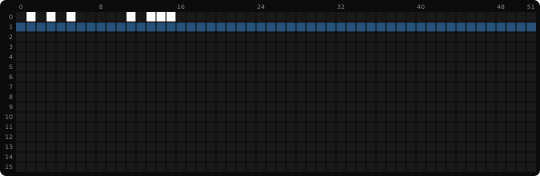
With the small font, y = 6 puts the capitals on rows 1 to 5. Where text sits
lists the y for every font. A second line goes 8 rows lower, for example y = 14.
Moving text stands still
- Three moving texts. A script moves two texts at a time. A third
scroll_text()in the same frame makes all of them start over in every frame, so none of them moves. Keep two at most, and give further lines their own turn, as Two moving texts at once shows. - The text fits.
scroll_text()moves only text that does not fit. Text that fits stands still in the middle of its columns.
The app leaves in the middle of its text
Your app leaves after its usual time, even when its moving text has not run through. Pass
{"repeat": 1} to scroll_text(), and the app stays until the text has run through once. See
Keep the app until the text was read.
A value is always 0
Whole numbers divide without a remainder: 50 / 100 is 0, so 50 / 100 * 32 is 0 as well.
Multiply before you divide (50 * 32 / 100 is 16), or make one of the numbers a real
(50 / 100.0 is 0.5).
Nothing is drawn
Drawing calls work only in draw(). In loop(), setup() or a callback they do nothing and raise
no error. Keep the value in a member there, and paint it in draw().
An icon does not show
icon() draws an icon by name only when it is on the clock. Otherwise it returns false and draws
nothing. Name the icons in an @icons line and install them with one button, as
The icons your script needs shows. A frame takes up to 4
different icons: icon() returns false for a fifth.
The app never shows
should_show()returnsfalse. The Apps tab shows the label skipped on its row. See Skip a turn.- The script is marked
@headless true, so it never draws, or@ondemand, so it waits to be started from the device menu. - The app is switched off on the Apps tab.
- Scripts are switched off under System → Scripting. A banner on the Apps tab says so.
Details
The caps
Every limit a script runs under, such as memory, HTTP, MQTT and timers, and what happens when you reach it is listed under Scripting in Limits.
How many scripts fit depends on the memory set aside for scripts, which all scripts and modules share:
- A quarter of the available memory at startup, at most 4 MiB.
Device state shows the figure for your device. Keep each script small. Keeping scripts small shows how.
What scripts cannot do
Scripts cannot reach files, the system or other programs' memory. Each script has its own names: its class and top-level variables belong to it alone.
These modules are available:
| Module | For |
|---|---|
string |
formatting, splitting, searching |
json |
json.load() / json.dump() |
math |
the usual, plus math.rand() |
gc |
gc.collect(), gc.allocated() |
strict |
reports more mistakes when you save, such as a new name without var |
global |
the script's own globals |
These are not available, and import raises an error: os, sys, time (use the
time functions instead), debug, solidify and
introspect. The built-in functions open and input are disabled too.
Scripts don't disturb each other
- Errors stay inside one script. Each call has its own instruction limit, so one app raising an error or looping forever breaks only itself.
- Names stay inside one script. App A cannot see app B's class, members or callbacks, and two apps may use the same class name. What an app publishes can be read by all but written only by its owner. What a module returns can be read by every script that imports it.
- Memory is shared. All scripts use the same memory, so an app that keeps growing its lists takes memory from the others.
These rules protect AWTRIX from accidents. They do not protect you from a script you chose to install: it can publish to any MQTT topic and fetch any URL. Treat a script you did not write like any other program you run.
Related
- Limits: every limit a script runs under
- Errors → Script installation: what the HTTP API answers when an install fails
- Keeping scripts small: memory, step by step
- Troubleshooting: AWTRIX hangs or restarts after you install a script
- How the display works: where text sits and when it moves